


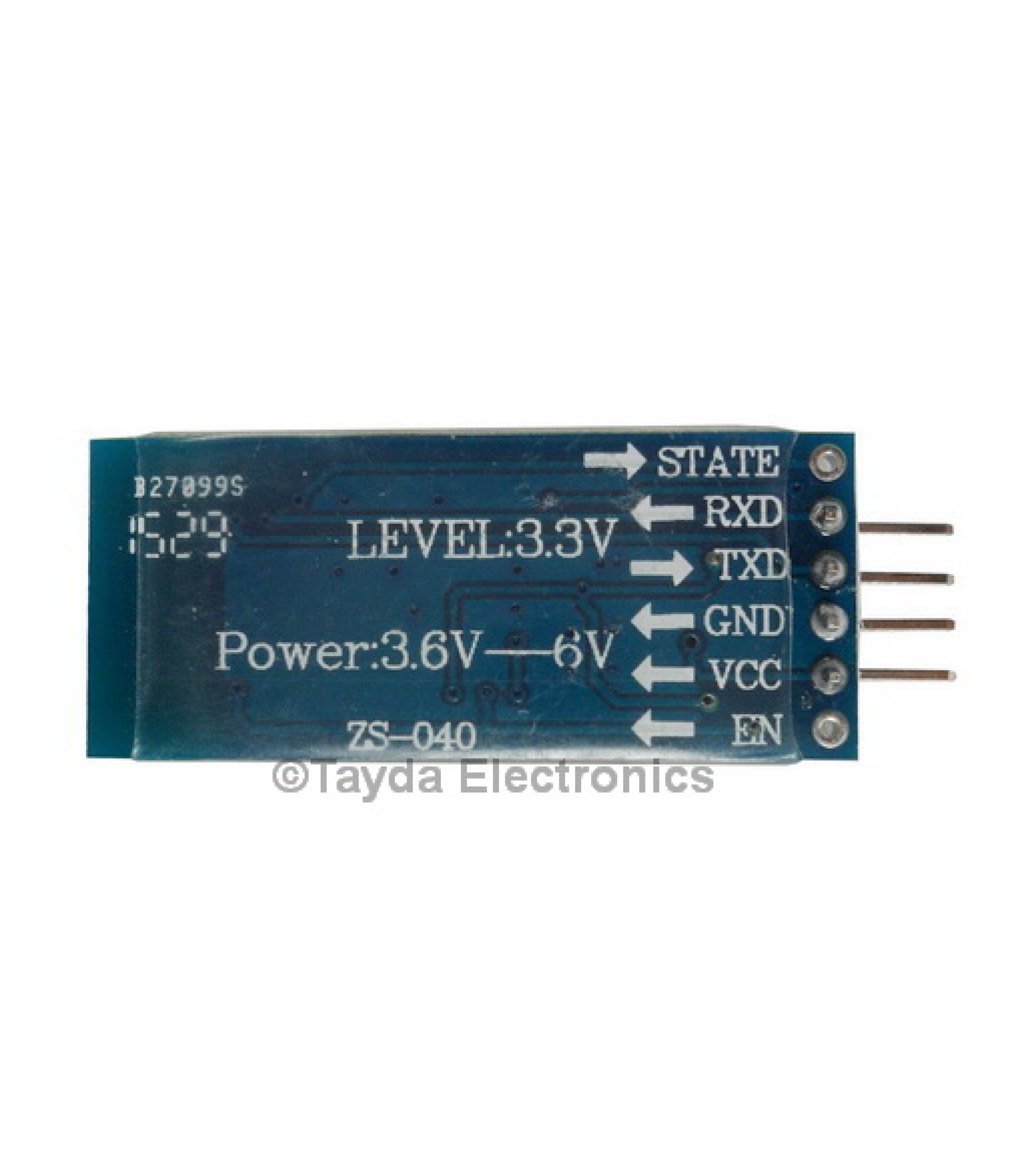

HC-06 Bluetooth Transceiver Module — module / board
HC-06 Bluetooth Transceiver Module — module / board。售价 3.25 USD,当前有货,SKU NULL,归类于 PCBs – Breakout Boards – DIY Kits,页面可抽取 3 项量化参数。
- SKU
- NULL
- Price
- 3.25 USD
- Stock
- 有货
- Category
- PCBs – Breakout Boards – DIY Kits
适用场景 (Applicable scenarios)
- 无人机整机装机与备件替换
核心参数 (Core specifications)
- 价格 / Price:3.25 USD
- Voltage:3.3v
- Default Baud Rate:9600 bit/s
- Size:28 x 15mm
竞品对比 (Competitor comparison)
- 本站现价 3.25 USD;同级竞品报价需商家提供后补全
- 可核对型号 SKU:NULL,便于与竞品逐项对照
- 已公开 3 项量化参数(见上节),可直接与竞品同参数比较
- 待商家补充:原厂/第三方参考价与差异结论
常见问题 (FAQ)
HC-06 Bluetooth Transceiver Module 多少钱? / How much does it cost?
HC-06 Bluetooth Transceiver Module 现价 3.25 USD,库存状态:有货。
HC-06 Bluetooth Transceiver Module 的 SKU / 型号是什么? / What is the SKU?
SKU:NULL。
HC-06 Bluetooth Transceiver Module 的核心参数有哪些? / What are the key specifications?
Voltage:3.3v;Default Baud Rate:9600 bit/s;Size:28 x 15mm。
HC-06 Bluetooth Transceiver Module 属于哪个类目? / Which category is it in?
类目:PCBs – Breakout Boards – DIY Kits。
HC-06 Bluetooth Transceiver Module 适合哪些使用场景? / What is it used for?
module / board 相关场景:无人机整机装机与备件替换。
HC-06 Bluetooth Transceiver Module
This nifty little bluetooth module is a serial pass through for any device that has a serial line. Use it to send data over bluetooth to your Arduino, Raspberry Pi, or other computer. Design an app on your phone to connect to an Arduino via bluetooth. Send data short distance between Arduino’s. Turn your TV off automatically, set up home automation systems, the options are endless with this low cost powerful bluetooth module.
Here is a quick wiring example. (I know it says its an HC-05, but it’s the same wiring and the same form factor except this board says HC-05 instead of HC-06.)
And a quick sketch to get you up and running is available here.
Using this sketch is super simple. First, you must connect the bluetooth device to your laptop. Usually it pops up as “HC-06”, but when I first connected mine to my laptop it showed up as the bluetooth address or something like “20-16-02-15-04-84”. To pair you must use the predefined code of 1234.
Second, once you have this finished you should open up the terminal and type the command: ‘ls /dev/tty*’ (for those that are new to this do not include the apostrophes in the terminal)
You should be looking for the something that says /dev/tty.HC-06 (mine says /dev/tty.HC-06-DevB on my MacBook Pro). Note this path for future use.
Third, upload the sketch to the Arduino, and head back to the terminal.
Fourth, you should be at the terminal and you need to type: ‘screen /dev/tty.HC-06’ (the path you noted earlier goes after screen, in this case the path we noted was /dev/tty.HC-06)
Fifth, hit the reset button on the Arduino. Now you should see “Hello from Arduino.” in the terminal! If you type 1 it should turn on the LED attached to pin 13. If you type 2 it should turn the LED off. It will let you know whether the LED is on or off in the terminal.
Now with this knowledge go off and build something fun that you can connect to your laptop, phone, or other bluetooth device!
If you need any help with this example or using the HC-06 at all let us know in the forum. HC-06 General Help Forum
Voltage: 3.3v
Default Baud Rate: 9600 bit/s
Serial Interface: RS-232
Bluetooth Protocol: v2.0
Datasheet: Click Here
Size: 28 x 15mm
More Information
Same Spec Items
–
SKU
A-1664
Can be used with
–


